Catálogo Tokioschool

Just another WordPress site

Unity game development with Virtual Reality

  • Presentation
  • Methodology
  • Your classes
  • Online platform
  • Contents overview​
  • Digital teachers
  • Internships
  • Certifications
  • We are Tokio
  • Contact
  • Presentation
  • Methodology
  • Your classes
  • Online platform
  • Contents overview​
  • Digital teachers
  • Internships
  • Certifications
  • We are Tokio
  • Contact
  • Presentation
  • Methodology
  • Your classes
  • Online platform
  • Contents overview​
  • Digital teachers
  • Internships
  • Certifications
  • We are Tokio
  • Contact
  • Presentation
  • Methodology
  • Your classes
  • Online platform
  • Contents overview​
  • Digital teachers
  • Internships
  • Certifications
  • We are Tokio
  • Contact

COURSE

Unity game development with Virtual Reality

ZetaGaming-blanco-220x145

Official sponsors
of ZETA Gaming

Discover Tokio School

Presentation

The video game industry is the main engine of global entertainment. Every two minutes a video game is sold with an almost cinematographic quality that allows interaction with players located on the other side of the planet or that the user himself is the protagonist of the story.

Thanks to this master’s degree in video game programming with Unity 3D you will be able to create complete video games (from the initial design to their export to real devices for testing or distribution). You will immerse yourself in virtual reality or augmented reality and you will become an ace of movement through scripts. It’s time to go to the next level!

Objectives

Carry out complete game development, from initial design to export, testing and distribution
Master the C# programming language, having the skills of a programmer
Manage and develop Virtual Reality and Augmented Reality software
Know how to optimise so that our creations can run on as many devices as possible
Apply design patterns and other good practices so that the code meets the quality standards of the best companies
Know the new tools and services of Unity 3D

Career opportunities

Freelance or Indie Studio Developer
Technical tester in the video game industry
Game Design or responsible for the dynamics and mechanics of the videogame
Developer of Virtual and Augmented Reality applications
Video game programmer in Unity 3D
Exercise of rights: access, rectify and delete your data, as well as exercise other rights by the provisions of the Privacy Policy.
Alejandro BorregueroMaster's Degree in Video Game Programming and Virtual Reality

Alejandro Borreguero
I was a very shy kid, but the games helped me a lot and I want to give this to other people. I feel very identified with Tokio because of the passion with which they do things.
Unai ZabalaExpert Package in videogame creation. Design & Unreal Engine Programming

Unai Zabala
With a degree and a master's degree in gamification, I found it difficult to find a job and I came to Tokio to specialise. I found the university to be very individualistic, in Tokio I see everything as more connected.
Andreu IbañezAdvanced course in videogames
Andreu Ibañez
I've always dreamed of creating video games but I saw it as something unreal, until Tokio gave me the push I needed. I am a set of frustrated vocations and Tokio has reconciled them all.
Guillermo OrbeaVideo games programmer with Unity and Unreal Engine
Guillermo Orbea
He terminado mi formación en Python y voy a especializarme en la profesión del futuro: Inteligencia Artificial. Repito con Tokio porque mi nivel de satisfacción, en especial con el profesor, es de un 120%.
Oriol MarcoProgramación Python
Oriol Marco
Yo en una formación busco dos cosas: contenidos y atención, y en Tokio lo he tenido. Después de dos ingenierías y un máster en análisis de datos, en solo dos meses he terminado la formación que me va a permitir retomar mi pasión: la programación
Nayra BlancoProgramación Python

Nayra Blanco
Soy desarrollador web pero quería evolucionar profesionalmente y recurrí a Tokio. Cristian, el profesor, es un gran profesional y no se limita al temario, sino que la escuela y él Cristian se mojan para darnos siempre más y la sensación es que sales muy satisfecho.
Jorge Alejandro DíazProgramación Python

Jorge Alejandro Díaz

Methodology

Tailor-made method
Digital teachers
Personalised tutoring
Practical training
Online classes
Tailor-made method

Our courses do not have a start and end date. With Tokio’s 100% online training programme, you decide your pace, circumstances and capabilities and we follow you. Ours is «tailor-made» learning.

Digital teachers

They are your teachers, experts with real knowledge that will help you to improve your knowledge of this profession.

Personalised tutoring

Our educational advisors will accompany you throughout your training. They will help you achieve your goals through realistic objectives, organisation and motivation for tokiers!

Practical training

Self-assessment questionnaires, final exams, exercises, case studies… Learning by doing! You will learn by doing. In addition, you will have up to 300 hours of quality professional internships in companies in the sector.

Online classes

You will have live classes. And if you have not been able to attend, no problem! We’ll upload them to the virtual platform so you can watch them as many times as you want.

Final project
Soft Skills
Job Orientation
Employment Observatory
Final project

You’re almost there! To conclude your training, you’ll have to demonstrate everything you’ve learned through a project.

Soft Skills

You will receive extra training to improve your skills (communication, leadership, teamwork…) thanks to our short courses.

Job Orientation

We will give you all the keys to succeed in any selection process.

Employment Observatory

We put at your disposal, on the student platform, an Employment Observatory where you will find the best job opportunities according to your preferences and your sector.

Your classes

Live
You can connect live to the classes with your specialist teacher. The online classes will follow the syllabus and raise new questions and information that goes beyond the theoretical content of the books. At the end of each class, you can ask your questions so that the teacher can answer them live.
On a recorded basis
If you can’t attend a class live, don’t worry! All classes are recorded and uploaded to your platform so that you can access them whenever you want.
Doubt resolution
The digital teachers will dedicate the whole class to solving your doubts, exercises or practical cases. It is an excellent opportunity to interact with the specialist teacher, ask your questions and learn from the doubts of other classmates.
Masterclass

You will be able to attend online masterclasses given by renowned professionals in the sector who collaborate with Tokio School by sharing their experiences. These sessions will also be participative and you will be able to ask them your questions.

Online platform

Our methodology is designed so that you become
the protagonist of the learning process.

Content overview

Module 1: First steps

Unit 1: What is and what surrounds Unity 3D?

  • History of Unity
  • Main engines
  • Unity versions
  • Main competitors
  • Main advantages

Unit 2: The Assets Market

  • What are the assets?
  • Available categories in the asset store

Unit 3: Unity 3D Editor

  • Main panels in Unity 3D

Unit 4: Scenes

  • Scene creation: important elements

Unit 5: GameObjects and components

  • What are GameObjects?
  • What are Components?
  • Types of Components

Unit 6: Prefabs

    • Modifying a prefab
  • Nested prefabs
  • Prefabs variants
  • Multi-level override
  • Unpack a prefab
  • Destroy a prefab

Unit 7: Spaces and cameras in Unity 3D

  • Space in Unity 3D
  • Properties of the elements
  • Cameras in Unity 3D
  • Cameras with perspective
  • Orthographic cameras

Unit 8: Basics of lighting

  • Lighting techniques

Unit 9: The lighting panel

  • Light configuration
  • Properties

Unit 10: Types of lights and shadows

  • Type of lights
  • Type of shadows
  • Settings
Module 2: C# and scripting in Unity 3D

Unit 1: C# and other languages available in Unity 3D

  • Programming languages in Unity
  • What is C#?

Unit 2: The Script component

  • How to create Script in Unity?
  • Functions

Unit 3: Variables, types and display in the editor

  • Variable properties
  • Declaration of a variable
  • Checking variables

Unit 4: Arrays

  • Declaration of an Array
  • Structure of an Array

Unit 5: Functions

  • Characteristics
  • Parts of a function
  • Functions with or without return
  • Checking a function

Unit 6: Control structures

  • if/else structure
  • While structure
  • Switch structure
  • For structure
  • Foreach structure

Unit 7: Components and scripting control

  • How to make changes to component properties

Unit 8: Monobehaviour parent class

  • Stages of the cycle

Unit 9: GameObject management in the scene through scripting

  • Instantiate method
  • Destroy Method

Unit 10: Other interesting aspects of C# programming

  • SetActive method
  • Corrutines
Module 3: Physics, inputs and other aspects

Unit 1: Physics in Unity 3D

  • Rigidbody Component – Properties
  • Component Collider – Types
  • Character Controller – Properties
  • Joints – Types

Unit 2: Materials, textures and shaders

  • What are materials?
  • How to create a material?
  • What are textures?
  • What is a shader?
  • Energy conservation
  • High Dynamic Range (HDR)

Unit 3: Animation and animator

  • Mecanim 
  • Keyframe
  • Animation
  • Animator Controller

Unit 4: Particle System

Unit 5: Inputs

  • Configuration of Inputs
  • Use of Imputs in scripts
  • Imputs on mobile devices

Unit 6: Navigation system

  • Usefulness of the navigation system
  • Elements of the navigation system
  • Creation of the navigation area

Unit 7: Audio

  • Elements of sound systems in Unity
  • Audio Mixer What are they, their uses and properties?

Unit 8: UI and canvas

  • Rect Tool
  • Rect Transform
  • Pivot
  • Anchors
  • Canvas – Modalities
  • Elements of an interface

Unit 9: PlayerPrefs

    • What is serialisation?
  • PlayerPrefs methods or functions

Unit 10: Inputs’ new system

  • Settings
  • Summary of all other buttons
Module 4: Virtual, augmented and mixed reality

Unit 1: Introduction to Virtual Reality

Unit 2: Preparing our VR project

  • Main Virtual Reality devices
  • Steps to prepare the Virtual Reality project
  • Tools

Unit 3: Camera, movement and interactions in VR

Unit 4: Optimisation and creation of our first project 

  • Tools – Profiler panel
  • Geometry of 3D models
  • Use of Ligthmapping
  • Occlusion Culling
  • Textures
  • Shaders
  • Quality Settings

Unit 5: Introduction to Augmented Reality

  • What is Augmented Reality?
  • Systems for visualising Augmented Reality
  • Areas of application of Augmented Reality

Unit 6: Main alternatives for AR use in Unity

Unit 7: Preparing our AR project with Vuforia

Unit 8: Implementing our first application with AR

Unit 9: Introduction and implementation of Mixed Reality

Unit 10: Raycasting

  • Properties and implementation
  • Usage and functionality
Module 5: Advanced programming aspects

Unit 1: Introduction

  • Preliminary considerations
  • Naming conventions in programming
  • Programming language
  • Types of Errors and Alerts

Unit 2: Introduction to object-oriented programming (OOP)

  • Structured Programming vs. Object Oriented Programming
  • What is an Object in OOP
  • Constructor methods
  • What is Inheritance?

Unit 3: Static classes

Unit 4: Constants and enumerations

Unit 5: State machines

  • Math class
  • Static variables

Unit 6: Relevant mathematical functions

Unit 7: Delegates

  • Definition and characteristics
  • Creation and structure of a Scriptable Objects

Unit 8: Scriptable Objects

Unit 9: Design patterns I

  • Definition and advantages of use
  • Characteristics
  • Types of patterns
  • Singleton pattern

Unit 10: Design patterns II

Unit 11: SOLID Principles

  • Solid S (Single Responsibility)
  • Solid O (Open – Closed Principle)
  • Solid L (Liskov Substitution)
  • Solid I (Segregation of Interfaces Principle)
Module 6: Services, integration and publishing

Unit 1: Audio Mixer

Unit 2: Cinemachine

  • Basic virtual camera
  • Cinemachine virtual camera
  • Cinemachine composer and transposer
  • Camera tracking and player input
  • Axis state
  • State driven camera
  • Cinemachine scripting

Unit 3: Advanced inputs (smartphones) 

  • Unity Remote
  • Mobile: Touch
  • Gyroscope and accelerometer
  • GPS positioning

Unit 4: Unity Services: Ads y Collaborate

Unit 5: Unity Analytics

  • Data analysis in video games
  • Unity Analitics – Introduction and configuration
  • Creating an event from the Unity Inspector
  • Creating an event from scripting

Unit 6: Architecture in games made with Unity

Unit 7: Advanced optimization

  • Graphics – Level of detail (LOD) – Configuration
  • Physics – Rigidbody
  • Physics – Collision Layers
  • Code – Content of Loops
  • Code – Use of cyclic functions

Unit 8: Project assembly

Unit 9: Render

  • Línea de renderizado de alta definición (HDRP)
  • Canalización de renderización universal (URP)
  • Compatibilidad de la tubería de renderizado

Unit 10: Commercialisation

  • Portfolio
  • Digital markets
  • Upload to the Store

Unit 11: Multiplayer with Photon Engine

Sukiru: soft skills for digital samurai

You will receive extra training to improve your skills (communication, leadership, teamwork…) thanks to our short courses.

Sukiru: soft skills for digital samurai

You will receive extra training to improve your skills (communication, leadership, teamwork…) thanks to our short courses.

#alwaysforward

Students' work

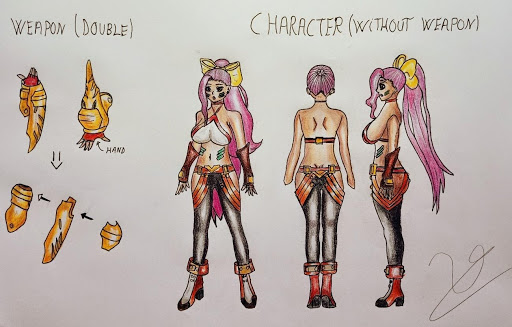
Final project Unai Zabala Professional career in Video Game Design

Although it is still in progress, the student’s project aims to be a video game. More specifically a ‘3D fighter’ where there will be unique and eye-catching characters with devastating final attacks. The combat will be very animated, resembling the combat system of the «hack and slash» genre, and with a hand-drawn character design!

Digital Masters

He defines himself as a Creative Technologist. He has worked as a researcher and professor at CENTRO University. He worked as a developer of XR projects for brands such as Nike, LVMH, META and Playboy.
Nicolas SpitalierSenséi
nicolas-spitalier

Time to get on the tatami

Do you want to show what you’re worth? At Tokio School we have agreements with more than 3,000 companies in the technology and digital sector. You can do up to 300 hours of optional internships while expanding your network and your CV. Where would you like to do an internship? Suggest companies! You will be part of Tokio Net, our network of students and alumni.

Certifications

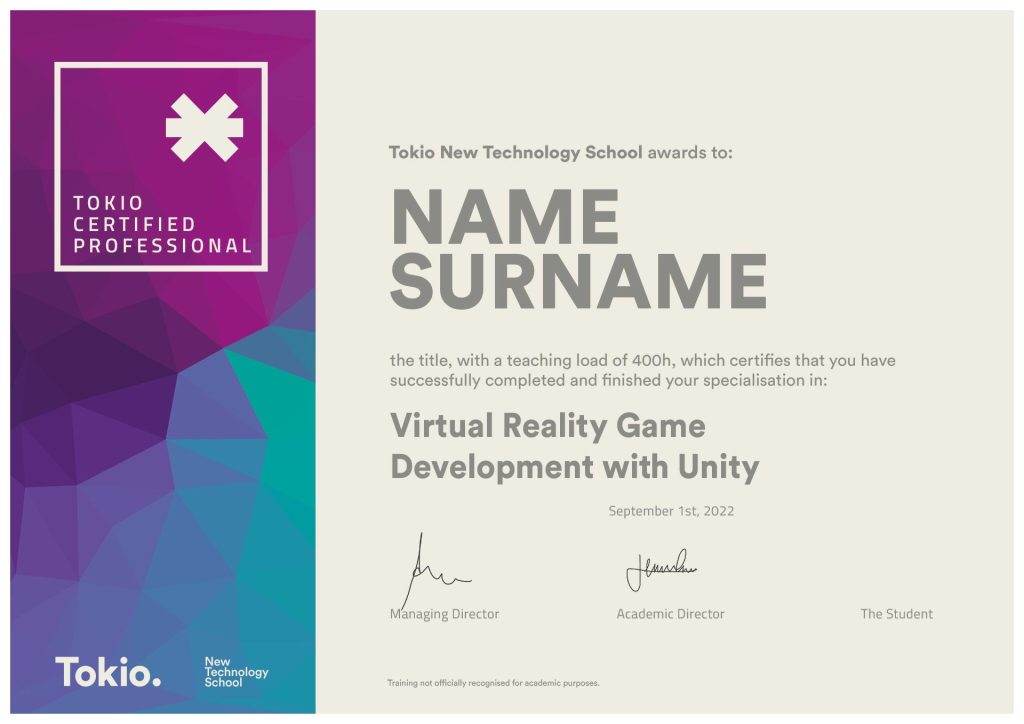
Once you have finished your training you will receive the following qualifications:

diploma-unity
Big Data Course
*Training not officially recognised for academic purposes

We are Tokio

We’re not the kind of people who like to pin medals on themselves, but if others do…

excellence-2022_A-_Tokio_best_training_center_esports-2

TOP Educational Agreements

Tokio School & ZETA: from gamers to gamers

We feel and live esports, and we are official sponsors of ZETA Gaming, one of the most promising top clubs. Do you know them?
#TokioSchoolxZETA #MakeThePlay

Contact

Do you have any questions? We are at your disposal for whatever you need.

+353 (1) 9026926

+31 (20) 3694593

+44 (20) 38079342

+32 (2) 7810204

+45 (7) 0890272

The content of this catalogue is subject to change at the discretion of the centre's management. The information not related to the centre contained in this catalogue is subject to the decision of the administration or competent authority.

Training is not approved for official academic purposes.

#alwaysforward

Machine Learning

Machine Learning was born from pattern recognition, but today it allows us to develop applications that improve their performance by «learning» from data collected in past situations. In this Python specialisation you will be able to apply Machine Learning to real projects, including preparation and related tasks, deployment in production and the lifecycle of a model.

MODULE 1: INTRODUCTION TO MACHINE LEARNING

Unit 1: Introduction to Big Data and Machine Learning

  • Introduction to Machine Learning
    • The theory of gravity
    • The scientific method
    • Mathematical models
    • Scientific method applications
    • Data science
    • Introduction to Big Data
    • Introduction to Machine Learning
    • The equation of the straight line
    • Model training
    • Working with Machine Learning models
    • Machine Learning applications
    • AlphaGo
  • Linear algebra
    • Relationship to the areas of big data, machine learning and artificial intelligence
    • Elements
    • Operations and properties

Unit 2: Work environment

Unit 3: Python and Scikit-learn numeric libraries

MODULE 2: SUPERVISED LEARNING

Unit 1: Linear regression 

  • Simple
    • Model equation
    • Graphical representation
    • Types of variables
  • Multivariable
    • Data modelling
    • Curve modelling
    • Analytical resolution
    • Cost function
    • Solving by iterative methods
    • Resolution algorithm

Unit 2: Gradient descent optimisation

  • Gradient descent
  • Convergence
  • Local and global minima
  • Learning ratio
    • Learning ratio choice
  • Training algorithm

Unit 3: Standardisation, regularisation and validation

  • Standardisation
    • Problem
    • What is standardisation?
    • Updated training algorithm
  • Regularisation
    • Deviation and variance
    • Regularisation
    • Regularised cost function
  • Cross-validation
    • Resolution methods
    • Dataset subdivision
    • K-fold
    • Updated training algorithm

Unit 4: Bayesian models and model evaluation

  • Example: carcinogenic cells’ classification
  • Sensitivity and specificity

Unit 5: Classification

  • Decision trees
    • Representation
    • Main concepts
    • Categorical and continuous target variables
    • Node splitting
    • Advantages and disadvantages of decision trees
    • Limitations on tree size
    • Tree pruning
    • Decision trees vs. linear models
    • Bootstrapping
    • Training algorithm
  • Logistic regression
    • Data modelling
    • Binary and multi-class classification
    • Hypothesis
    • Activation function: sigmoid
    • Cost function
    • Training algorithm: binary classification
    • Training Algorithm: multiclass classification
  • Classification by SVM
    • Logistic regression vs. SVM
    • Hypothesis
    • Kernels and landmarks
    • Hypothesis transformation
    • Types of kernels available
    • Cost functions
    • Regularisation parameter
    • Training algorithm: multiclass classification

Unit 6: Introduction to neural networks 

  • Natural neurons
  • Artificial neurons
  • Perceptron
  • Multi-layer or deep neural networks
    • Propagation of predictions
    • Cost function
    • Training
    • Multi-class classification
    • Training algorithm: binary classification
MODULE 3: UNSUPERVISED LEARNING

Unit 1: Optimisation by randomisation

  • Problem: local minima
  • Multiple initialisations
  • Implementation

Unit 2: Clustering

  • Differences between clustering and classification
  • K-means 
  • Other clustering algorithms
MODULE 4 – SEMI-SUPERVISED LEARNING

Unit 1: Anomalies detection

  • The problem
  • Anomalies in supervised vs. unsupervised and semi-supervised learning
  • Model representation
  • Choice of features
  • Normal or Gaussian multivariate distribution
  • Training algorithm

Unit 2: Recommendation systems

  • Linear regression recommendation systems
  • Recommendation systems approach
  • Cost function
  • Training algorithms
  • Prediction performance
  • Similarity between examples

Unit 3: Genetic algorithms

  • Natural evolution
  • Natural evolution of behaviour
  • Main concepts
  • Algorithms applied to optimisation
  • Examples
MODULE 5: AUTOMATIC LEARNING SYSTEMS DEVELOPMENT

Unit 1: ML systems approach

  • Initial approach
    • Data cleansing and transformation
    • Large-scale implementation

Unit 2: Feature engineering

  • Definition and characteristics
  • Creation of characteristics
  • Problems and solutions
  • Data quality

Unit 3: Principal Components Analysis (“PCA”)

  • Variables representation
  • Dimensionality reduction
  • Definition and applications
  • Visual representation

Unit 4: Assemblies

  • Definition and applications
  • Types of errors
  • Assembly techniques
  • Bagging
  • Max voting
  • Mean and weighted mean
  • Random forest
  • Boosting and adaptive boosting or AdaBoosting
  • Stacking

Unit 5: Models’ evaluation and improvement

  • Deviation and variance
  • Evaluation metrics: linear regression
  • Evaluation metrics: classification
  • Deviation and variance avoidance
  • Error analysis and evaluation of results 

Unit 6: Operations in ML

  • ML Engineering 
  • Operations in ML